How to Earn Cashback & Lower Your Fees: Introducing the Chexy Referral Program
Dec 30, 2025
Written by
Written by
Brianna Harrison (Credit Card & Travel Writer)


Table of contents
Title
Title
Title
If you’ve used Chexy before, you know that paying your rent can actually earn you money. If you haven't, TLDR–you can pay your rent with a credit card and earn points, cash back, or miles.
At Chexy, we’re all about helping you get the most out of your rent payments–whether it's building your credit score, making rent payments easier, or earning cashback on rent. Now, we’re introducing a brand-new way to save even more with the Chexy referral program!
This tiered referral program lets you save on fees and rewards you and your friends for sharing the love. You can reduce Chexy fees to as little as 0.5% while earning cashback or points on your credit card—it’s a win-win!
Keep reading to find out how our referral program works, how easy it is to get started, and how much you can save with real-life examples.
How Does the Chexy Referral Program Work?
Our referral program is our way of making your payments even more rewarding. It’s made up of two parts:
First, when you refer someone to Chexy, they get $15 in Referral Balance towards their next payment.
But that’s not all–this program is designed to help you save even more over time. As you refer more people, your Chexy processing fees decrease, meaning you get to keep more of your credit card rewards and pay fewer fees.
Here’s how it works:
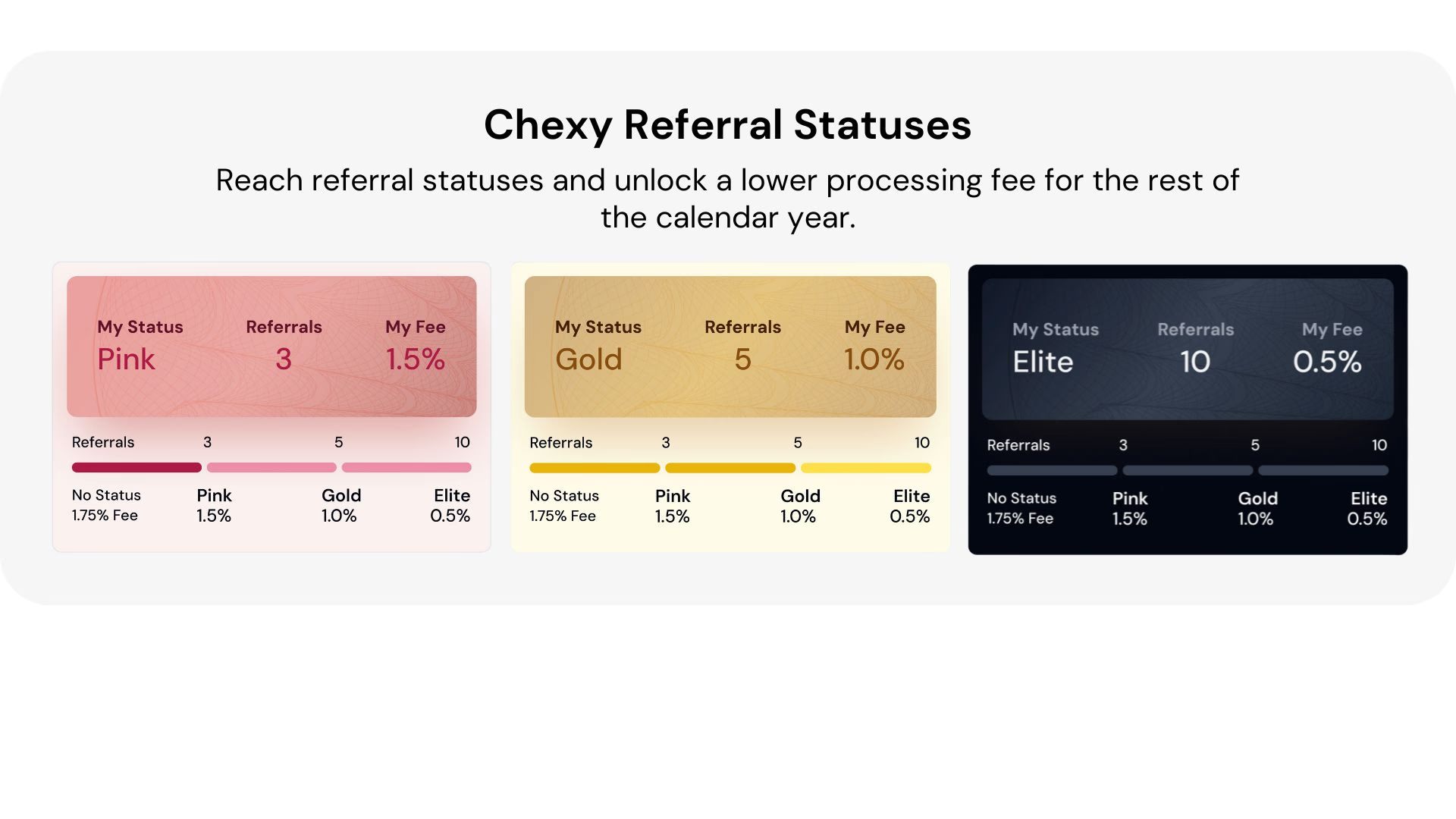
3 Referrals or less = Basic Status: 1.75% Processing fee + $15 cashback for each referral
3+ Referrals = Pink Tier: Processing fee drops from 1.75% to 1.50%.
5+ Referrals = Gold Tier: Processing fee drops to 1%.
10+ Referrals = Elite Tier: Processing fee drops to just 0.5%.
Every time a friend activates their Chexy account through your referral code, you move closer to unlocking a new referral status. Each status reduces your processing fee, meaning you pay less and earn even more rewards for yourself.
You will only receive $15 cashback while you're in Basic status. Once you move into Pink, Gold, or Elite, your reward becomes lower processing fees instead of cashback. Your referred friends will always receive $15 cashback on their first payment, regardless of your status.
Keep in mind that your friends must activate their Chexy account through your referral for it to count toward your status progress and for them to earn $15.
There is no limit to how many people you can refer. The more you refer, the more Referral Balance you earn, allowing you to save even more on your rent payments.
Here’s a top tip: Focus on getting as many referrals as possible early in the year—starting now! The sooner you reach Gold or Elite tiers, the more you’ll save on Chexy processing fees and maximize your credit card rewards.
Referral statuses reset on March 1st of every year, so reaching a higher status early means enjoying more rewards for longer. Keep in mind that once you pass $50,000 in discounted spending, any additional payments are charged at the standard fee for your credit card type.
How Do I Refer Someone?
Accessing your referral code is simple. All you need to do is:
1. Log into your Chexy Dashboard.
2. Click Referrals and copy the link to share your invite code.

3. Share your unique referral link with friends and family.
4. When one of your friends activates their Chexy account, you’ll both earn $15 (while you're in the Basic tier).
5. Each referral brings you closer to unlocking a new referral status, helping you save on Chexy processing fees and keep more credit card rewards.
How Can I See My Referral Status?
Log into your Chexy Dashboard and click the Referrals tab to see your referral status. Once inside, you’ll find key details about your referral progress:
Your Current Tier: Instantly see whether you’re in the Pink, Gold, or Elite tier based on the number of successful referrals you’ve made.
Referral Count: View the total number of friends you’ve referred and how many more referrals you need to reach the next tier.
Rent Cashback Balance: Track the rent cashback rewards you’ve accumulated from referrals ($15 each), which can be applied directly toward your next rent payment.
This dashboard gives you real-time updates, so you’re always in the loop. When one of your referrals signs up and completes their first rent payment, your dashboard will reflect the reward, helping you visualize how close you are to achieving lower processing fees and maximizing your savings.

Extending Your Referral Status
If the friends you refer continue using Chexy, you can keep your status for an additional calendar year without needing to refer new people.
Your status extension is based on the number of completed payments made by your referred friends, which we call your crew. We count payments completed in 2026 by friends you referred in 2026, as long as those payments are completed between January 1 and December 31, 2026. Your own payments do not count toward this total.
By the end of January, you will be able to see your progress toward a status extension directly on the Referrals page.
What you need to extend your status
At the end of the year, we will look at the total number of completed payments made by your crew. If you meet the requirement for your current status, we will automatically extend that status until December 31, 2027.
Status extension thresholds
Pink: 15 completed crew payments
Gold: 50 completed crew payments
Elite: 250 completed crew payments
If you hit the requirement for your current status, we’ll automatically extend it until December 31, 2027.
Here's a quick example:
Ryan refers 3 friends in 2026, which puts him in Pink status.
Friend 1 pays rent monthly → 12 completed payments
Friend 2 pays property tax → 3 completed payments
Friend 3 pays tuition → 1 completed payment
That’s 16 completed payments total. Since Ryan passed the 15-payment requirement, his Pink status is extended through the end of 2027.
How to Hack The Chexy Referral Program and Save Even More
If you want to maximize your rewards and reach Elite status faster (who doesn’t?), sharing your Chexy referral code is key. Here are a few ways to spread the word and get even more referrals:
1. Share It in Person
Conversations are a great way to introduce Chexy to friends, roommates, and coworkers. Next time someone talks about rent, mention how you save on fees and earn cashback with Chexy. Send them your referral link and maybe even help them sign up on the spot!
2. Use Social Media to Your Advantage
You can easily reach a wide audience and share your Chexy referral code through these platforms:
Reddit: Share your experience in relevant threads like r/PersonalFinanceCanada, r/TorontoRenting, or r/CanadaHousing. Many renters are looking for ways to save, and your referral code could help them.
Threads & X: Post about how Chexy saves money and share your referral link.
Instagram & TikTok: Create short videos explaining how Chexy works. Add your referral link in your bio or captions.
Facebook Groups: Join renting or budgeting groups and share your experience (as long as it’s allowed in the group’s rules).
3. Add It to Your Link in Bio
If you use Linktree, Beacons, or another link in bio service, add your Chexy referral link.
Remember, every referral brings you one step closer to a lower processing fee. The more people you refer, the more you save!
Chexy’s referral program is your chance to share the love and turn one of your biggest monthly expenses–rent–into a source of rewards and savings. Whether you have a cashback card or earn travel points with an Aeroplan credit card, this program helps you keep more rewards while reducing fees.
Don’t wait to start saving! Log into your Chexy account, grab your unique referral code, and share it with your friends and family. Be on your way to earning more rewards with lower fees today.
Not yet a Chexy user? Click here to get started.
Subscribe to our newsletter below for up-to-date credit card, travel, and rental content.
† Terms and Conditions apply.
If you’ve used Chexy before, you know that paying your rent can actually earn you money. If you haven't, TLDR–you can pay your rent with a credit card and earn points, cash back, or miles.
At Chexy, we’re all about helping you get the most out of your rent payments–whether it's building your credit score, making rent payments easier, or earning cashback on rent. Now, we’re introducing a brand-new way to save even more with the Chexy referral program!
This tiered referral program lets you save on fees and rewards you and your friends for sharing the love. You can reduce Chexy fees to as little as 0.5% while earning cashback or points on your credit card—it’s a win-win!
Keep reading to find out how our referral program works, how easy it is to get started, and how much you can save with real-life examples.
How Does the Chexy Referral Program Work?
Our referral program is our way of making your payments even more rewarding. It’s made up of two parts:
First, when you refer someone to Chexy, they get $15 in Referral Balance towards their next payment.
But that’s not all–this program is designed to help you save even more over time. As you refer more people, your Chexy processing fees decrease, meaning you get to keep more of your credit card rewards and pay fewer fees.
Here’s how it works:
3 Referrals or less = Basic Status: 1.75% Processing fee + $15 cashback for each referral
3+ Referrals = Pink Tier: Processing fee drops from 1.75% to 1.50%.
5+ Referrals = Gold Tier: Processing fee drops to 1%.
10+ Referrals = Elite Tier: Processing fee drops to just 0.5%.
Every time a friend activates their Chexy account through your referral code, you move closer to unlocking a new referral status. Each status reduces your processing fee, meaning you pay less and earn even more rewards for yourself.
You will only receive $15 cashback while you're in Basic status. Once you move into Pink, Gold, or Elite, your reward becomes lower processing fees instead of cashback. Your referred friends will always receive $15 cashback on their first payment, regardless of your status.
Keep in mind that your friends must activate their Chexy account through your referral for it to count toward your status progress and for them to earn $15.
There is no limit to how many people you can refer. The more you refer, the more Referral Balance you earn, allowing you to save even more on your rent payments.
Here’s a top tip: Focus on getting as many referrals as possible early in the year—starting now! The sooner you reach Gold or Elite tiers, the more you’ll save on Chexy processing fees and maximize your credit card rewards.
Referral statuses reset on March 1st of every year, so reaching a higher status early means enjoying more rewards for longer. Keep in mind that once you pass $50,000 in discounted spending, any additional payments are charged at the standard fee for your credit card type.
How Do I Refer Someone?
Accessing your referral code is simple. All you need to do is:
1. Log into your Chexy Dashboard.
2. Click Referrals and copy the link to share your invite code.

3. Share your unique referral link with friends and family.
4. When one of your friends activates their Chexy account, you’ll both earn $15 (while you're in the Basic tier).
5. Each referral brings you closer to unlocking a new referral status, helping you save on Chexy processing fees and keep more credit card rewards.
How Can I See My Referral Status?
Log into your Chexy Dashboard and click the Referrals tab to see your referral status. Once inside, you’ll find key details about your referral progress:
Your Current Tier: Instantly see whether you’re in the Pink, Gold, or Elite tier based on the number of successful referrals you’ve made.
Referral Count: View the total number of friends you’ve referred and how many more referrals you need to reach the next tier.
Rent Cashback Balance: Track the rent cashback rewards you’ve accumulated from referrals ($15 each), which can be applied directly toward your next rent payment.
This dashboard gives you real-time updates, so you’re always in the loop. When one of your referrals signs up and completes their first rent payment, your dashboard will reflect the reward, helping you visualize how close you are to achieving lower processing fees and maximizing your savings.

Extending Your Referral Status
If the friends you refer continue using Chexy, you can keep your status for an additional calendar year without needing to refer new people.
Your status extension is based on the number of completed payments made by your referred friends, which we call your crew. We count payments completed in 2026 by friends you referred in 2026, as long as those payments are completed between January 1 and December 31, 2026. Your own payments do not count toward this total.
By the end of January, you will be able to see your progress toward a status extension directly on the Referrals page.
What you need to extend your status
At the end of the year, we will look at the total number of completed payments made by your crew. If you meet the requirement for your current status, we will automatically extend that status until December 31, 2027.
Status extension thresholds
Pink: 15 completed crew payments
Gold: 50 completed crew payments
Elite: 250 completed crew payments
If you hit the requirement for your current status, we’ll automatically extend it until December 31, 2027.
Here's a quick example:
Ryan refers 3 friends in 2026, which puts him in Pink status.
Friend 1 pays rent monthly → 12 completed payments
Friend 2 pays property tax → 3 completed payments
Friend 3 pays tuition → 1 completed payment
That’s 16 completed payments total. Since Ryan passed the 15-payment requirement, his Pink status is extended through the end of 2027.
How to Hack The Chexy Referral Program and Save Even More
If you want to maximize your rewards and reach Elite status faster (who doesn’t?), sharing your Chexy referral code is key. Here are a few ways to spread the word and get even more referrals:
1. Share It in Person
Conversations are a great way to introduce Chexy to friends, roommates, and coworkers. Next time someone talks about rent, mention how you save on fees and earn cashback with Chexy. Send them your referral link and maybe even help them sign up on the spot!
2. Use Social Media to Your Advantage
You can easily reach a wide audience and share your Chexy referral code through these platforms:
Reddit: Share your experience in relevant threads like r/PersonalFinanceCanada, r/TorontoRenting, or r/CanadaHousing. Many renters are looking for ways to save, and your referral code could help them.
Threads & X: Post about how Chexy saves money and share your referral link.
Instagram & TikTok: Create short videos explaining how Chexy works. Add your referral link in your bio or captions.
Facebook Groups: Join renting or budgeting groups and share your experience (as long as it’s allowed in the group’s rules).
3. Add It to Your Link in Bio
If you use Linktree, Beacons, or another link in bio service, add your Chexy referral link.
Remember, every referral brings you one step closer to a lower processing fee. The more people you refer, the more you save!
Chexy’s referral program is your chance to share the love and turn one of your biggest monthly expenses–rent–into a source of rewards and savings. Whether you have a cashback card or earn travel points with an Aeroplan credit card, this program helps you keep more rewards while reducing fees.
Don’t wait to start saving! Log into your Chexy account, grab your unique referral code, and share it with your friends and family. Be on your way to earning more rewards with lower fees today.
Not yet a Chexy user? Click here to get started.
Subscribe to our newsletter below for up-to-date credit card, travel, and rental content.
† Terms and Conditions apply.
Disclaimer:
Financial institutions do not pay us for connecting them with customers. We may receive compensation in other ways, such as when someone applies for or is approved for a product. However, we do not receive payment for advertising, and not all products we list result in compensation for us. Advertisers are not responsible for the content on this site, including any editorial or review content that may appear. For complete and current information on any advertiser’s product, please visit their website.
Frequently Asked Questions
How does Chexy help me earn rewards?
How does Chexy pay my bills?
How much does Chexy cost?
What credit cards does Chexy accept?
How does Chexy help me earn rewards?
How does Chexy pay my bills?
How much does Chexy cost?
What credit cards does Chexy accept?
How does Chexy help me earn rewards?
How does Chexy pay my bills?
How much does Chexy cost?
What credit cards does Chexy accept?